
UUIDv7 Generator
Shortcuts: C copy · R new uuid · G generate bulk
UUID v7 generates values for the current time or a custom time you choose. A UUID v7 is a 128-bit, time-ordered identifier from RFC 9562 that starts with a Unix timestamp in milliseconds. Make one or up to 1,000, then copy or download them. Free, with no sign-up and nothing sent to a server.
Generate UUID v7 Online
Use the Generate tab to create a UUID v7 online, right in your browser. The tool builds each value from the current time plus random bits, so a fresh identifier is ready the moment you open the page.
This page works as a uuid7 generator, a uuid 7 generator, and a guid7 generator. The name changes from place to place, but the format stays the same, and generation runs in your browser, so nothing is sent to a server.
A v7 UUID is a 128-bit identifier defined in RFC 9562. Its first 48 bits hold a Unix timestamp in milliseconds, so the values sort roughly in the order you created them.
You will see the same identifier written as uuid v 7, guid v7, uuid-v7, or uuid_v7 in documentation, package names, and database columns. Whatever the spelling, each one points to version 7 of the UUID format.
How to Generate a UUID v7
You can generate UUIDv7 online in three quick steps:
- Open the Generate tab. The tool shows a newly generated UUID.
- Click Copy to place the value on your clipboard.
- Click New UUID whenever you want a different one.
Each click gives you a new UUID v7 with its own random bits, so you never reuse a value by accident. Keyboard shortcuts are available if you generate and copy often, which saves a trip to the mouse.
Need a quick test ID or a placeholder for an API call? Copy a uuid7 value from the tool and paste it straight into your code, request, or database.
Generating Multiple UUID v7 Values
Sometimes one identifier is not enough. When you need a batch of UUID v7 values for test data, fixtures, or a seed script, enter the number in the quantity field.
Presets save typing. Choose 1, 10, 50, 100, 500, or 1,000, or type your own number.
Use the separator dropdown to pick what goes between the values, so the output matches the format your project expects. Then click Generate UUIDs, or use the bulk-generation keyboard shortcut, and the tool creates the whole batch at once.
What Is UUID v7?
UUID v7 is a 128-bit identifier that starts with a Unix timestamp in milliseconds, followed by random data. It is defined in RFC 9562, and because the time comes first, new values sort after older ones.
In practice, UUIDv7 is a unique ID you can generate anywhere without a central counter, while still keeping your records in a sensible order. People who ask what is uuid7 are usually asking about the same thing, since uuid7 is simply a shorter way of writing the name.
You will also find it called UUID version 7 or version 7 UUID in specifications and database documentation. All of these names describe the same format.
UUID v7 Example and Format
Here is a UUID v7 example you can use to see the layout:
018f3c5e-7b2a-7c4d-9a1e-3f6b8d2c4e90
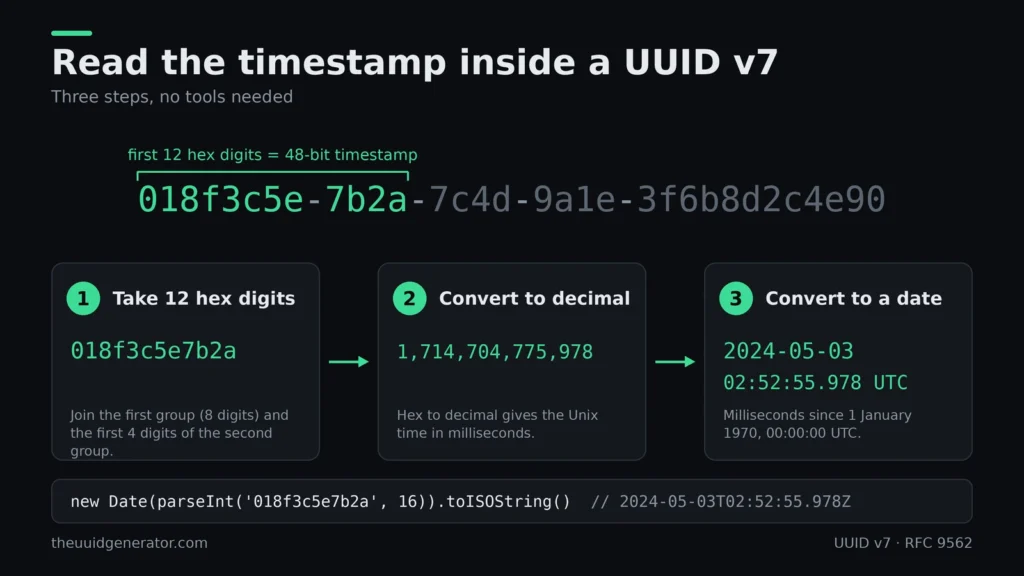
The same UUIDv7 example splits into five groups in the 8-4-4-4-12 pattern. The first 12 hex digits (018f3c5e7b2a) hold the timestamp, which is 2024-05-03 02:52:55.978 UTC. The digit 7 at the start of the third group marks the version, and the 9 at the start of the fourth group is part of the variant bits.
This UUID v7 format is the same canonical text form used by every UUID. A uuidv7 format value is written in lowercase or uppercase hexadecimal, and either one is valid.
Here is how the UUID v7 length and UUID v7 size work out:
- 128 bits, which is 16 bytes. This is the UUID v7 size when stored in binary.
- 36 characters in the standard hyphenated text form. This is the uuid7 length you see on screen.
- 32 hexadecimal characters once the hyphens are removed.
Every uuidv7 length figure above also applies to any other UUID version. Only the meaning of the bits changes. When you need the same uuid7 example in other formats, such as URN or Base64, the generator above can output them.
The uuidv7 size in a database depends on the column type. A native UUID column stores the 16 bytes, while a text column stores the full 36 characters.
UUID v7 Structure and Bit Layout
The UUID v7 structure splits the 128 bits into five fields. Here is the uuidv7 structure from left to right:
|
Field |
Bits |
What it holds |
|
Timestamp |
48 |
Unix time in milliseconds |
|
Version |
4 |
The value 7 |
|
rand_a |
12 |
Random or optional ordering bits |
|
Variant |
2 |
The RFC 9562 variant marker |
|
rand_b |
62 |
Random or optional counter bits |
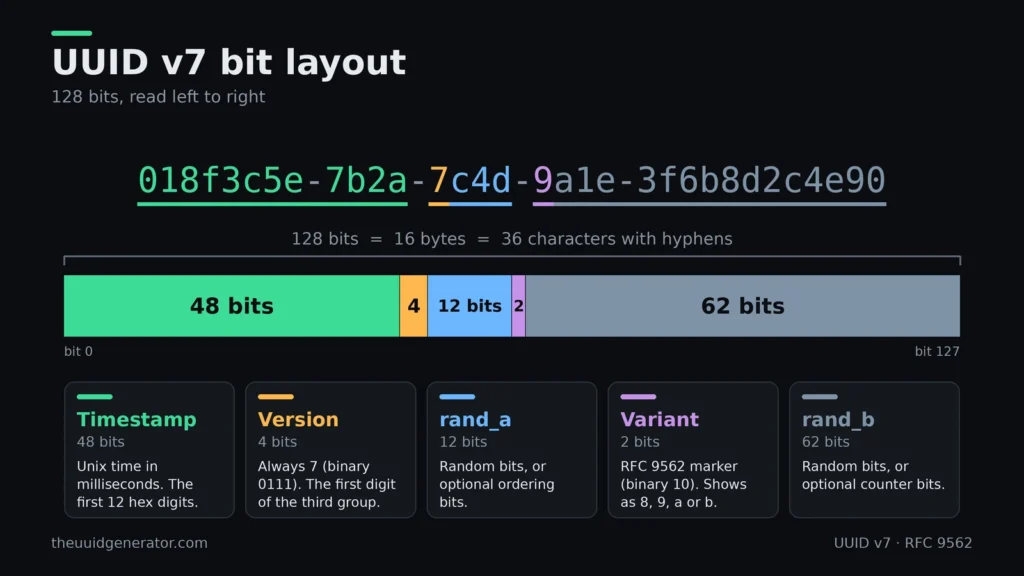
The bits add up to 128: 48 + 4 + 12 + 2 + 62. The generator shows this breakdown live for every value, along with the created time in UTC and local time, the Unix milliseconds, and the version and variant details.
It is tempting to call rand_a and rand_b purely random, but that is not always true. RFC 9562 lets an implementation use part of these fields for sub-millisecond timestamp bits or a counter, which keeps values created in the same millisecond in order.
UUID v7 Timestamp and Unix Milliseconds
The UUID v7 timestamp is the number of milliseconds since the Unix epoch, 1 January 1970 at 00:00:00 UTC. It sits in the first 48 bits, which is why the leading hex digits grow over time.
By default, UUID v7 timestamp precision is one millisecond. Two values created within the same millisecond share the same timestamp, so the random or counter bits decide which comes first.
Some implementations add sub-millisecond ordering information inside rand_a. That is a choice made by the generator, not part of the standard timestamp, so the timestamp itself always reads as whole milliseconds.
The tool shows the embedded time in three ways: UTC, your local time, and raw Unix milliseconds. Compare them to see exactly what moment a value represents.
Custom Timestamp UUID v7 Generation
Most generators stamp a UUID v7 with the moment you click the button. This tool gives you a choice: use the current time, or switch to Custom time and generate a UUID v7 for a moment you pick.
The first 48 bits of the identifier carry that timestamp. When you choose a custom time, the value embeds your chosen moment instead of the current one, and the remaining bits are filled the way they are for any other UUID v7.
Custom time is useful when you need identifiers that fit a specific point on the timeline:
- Test data that has to sort in a known order, such as records from last week next to records from today.
- Fixtures and seed scripts that should look like they were created at set times.
- Debugging, where you want to confirm how a given date and time appears inside a UUID v7.
Because the time comes first, values built from different custom times sort by those times. Two values built for the same time still differ in their other bits.
One thing to keep in mind: the timestamp inside the ID is the one you chose, not the time the ID was actually created. For records that need a trustworthy creation time, use the current time option and store the real date in its own column.
UUID v7 Sortability and Monotonic Ordering
A UUID v7 is sortable because the timestamp sits in the most significant bits. Sort a list of values as text or as bytes, and they line up by creation time. That is why a UUID v7 sortable by time is a common pick for database keys and logs.
Sorting by time and generating in strict order are two different things. Sorting is a property of the format. Strict ordering depends on how a generator handles values created close together, which is what the Monotonic option is about.
How UUID v7 Sorting Works
The first 48 bits of a UUID v7 hold a Unix timestamp in milliseconds. When two values have different timestamps, the one with the earlier time sorts first in the canonical text form, and the same holds for the raw bytes.
This is what makes uuidv7 sortable in practice. You do not need an extra column to recover the order, because the identifier already carries it.
Values with the same timestamp are a different case. Their order comes from the remaining bits, and what those bits hold depends on the implementation. If they are random, two values from the same millisecond can sort in either order.
Monotonic UUID v7 Generation
RFC 9562 describes optional techniques, such as a counter or extra timestamp bits, that keep values created in the same millisecond in order. The standard leaves the choice to the implementation, so not every generator behaves the same way.
This tool includes a Monotonic checkbox for that purpose. Turn it on when the order of values created within the same millisecond matters to you, for example in a bulk batch.
Leave it off when you only need identifiers that sort by time across milliseconds. Standard UUID v7 values already do that.
Where Sorting Breaks
|
Situation |
Fix |
|---|---|
|
Mixed upper and lower case hex |
Store and compare in one case |
|
SQL Server |
Store as |
|
Microsoft GUID byte order |
Use only if your system expects it |
|
Clock moves backward |
The RFC leaves handling to the implementation, so check your library |
IDs from different machines follow each machine’s clock, so their order can drift.
UUID v7 Output Formats and Formatting Options
A UUID v7 is 16 bytes of data, and every format on this page is just a different way of writing those same bytes. Pick the format your code, database, or API expects, and the value underneath stays the same.
The generator gives you two kinds of control. Format options change the encoding. Formatting options change how the text looks, such as case, hyphens, and wrapping characters.
Standard, URN, Base64, Base64 URL-Safe, and Hex Formats
Here is how one UUID v7 looks in each format:
|
Format |
Output |
Typical use |
|
Standard |
018f3c5e-7b2a-7c4d-9a1e-3f6b8d2c4e90 |
Databases, APIs, logs |
|
URN |
urn:uuid:018f3c5e-7b2a-7c4d-9a1e-3f6b8d2c4e90 |
Systems that expect a UUID URN |
|
Base64 |
AY88XnsqfE2aHj9rjSxOkA |
Compact text IDs |
|
Base64 URL-safe |
AY88XnsqfE2aHj9rjSxOkA |
IDs placed in URLs and filenames |
|
Hex (0x) |
0x018f3c5e7b2a7c4d9a1e3f6b8d2c4e90 |
Code and binary-style columns |
The Standard form is the 36-character string defined for UUIDs. The URN form adds the urn:uuid: prefix to that same string.
Base64 and Hex are different. They write the 16 raw bytes rather than the hyphenated string, so a Base64 value is much shorter than the Standard one. Do not mix them up: a system that expects the Standard string will reject a Base64 value, and the reverse is also true.
Base64 URL-safe swaps the two characters that cause trouble in web addresses, + and /, for – and _. This particular value has neither character, so both columns look the same. Other values may differ.
Uppercase, Hyphens, Braces, URL Encoding, and Quotes
These options change only how a value is written. The identifier does not change, and every UUID parser reads uppercase and lowercase as the same value.
- Uppercase: writes the hex digits A to F as capitals. Some Windows tools and older systems display GUIDs this way.
- Hyphens: keeps or removes the dashes. Without them, you get 32 hex characters in a row.
- Braces: wraps the value in curly braces, the style familiar from Microsoft GUIDs.
- URL-encode: converts characters that are not safe in a URL into percent codes. It matters most when you also use braces or quotes.
- Quotes: wraps each value in quote characters. Leave it on None for plain output.
UUID v7 vs UUID v4
UUID v4 is built from random bits. UUID v7 starts with a timestamp and adds random bits after it. Both are 128 bits long, both use the same 8-4-4-4-12 text format, and both work anywhere a UUID is accepted.
The real difference is order. A v4 value tells you nothing about when it was created, while a v7 value sorts by creation time. Choose v4 when you want no timing information in the ID, and v7 when the order of records matters.
UUID v7 vs UUID v4: Key Differences
|
UUID v4 |
UUID v7 |
|
|
Main design |
Random |
Time-ordered |
|
Generation |
Random bits from a secure source |
48-bit Unix timestamp in milliseconds, then random or counter bits |
|
Random data |
About 122 bits |
About 74 bits |
|
Timestamp |
None |
Yes, in milliseconds |
|
Time ordering |
No |
Yes, by timestamp |
|
Database use |
Inserts land at random positions in an index |
Inserts tend to land near the end of the index |
|
Timestamp exposure |
Nothing about creation time is exposed |
Creation time can be read from the ID |
|
Common use |
General-purpose identifiers |
Time-ordered identifiers, such as database keys and logs |
The random-bit counts come from the layout. A v4 keeps all but 6 bits for randomness, since 4 bits mark the version and 2 mark the variant. A v7 spends 48 bits on the timestamp, so fewer bits are left for randomness. That is still plenty for uniqueness in normal use.
Ordering is what matters most for databases. New v7 keys arrive in roughly increasing order, which suits B-tree indexes better than the scattered inserts that random v4 keys cause. How much that helps depends on your database and workload, so measure it before you promise a speed-up.
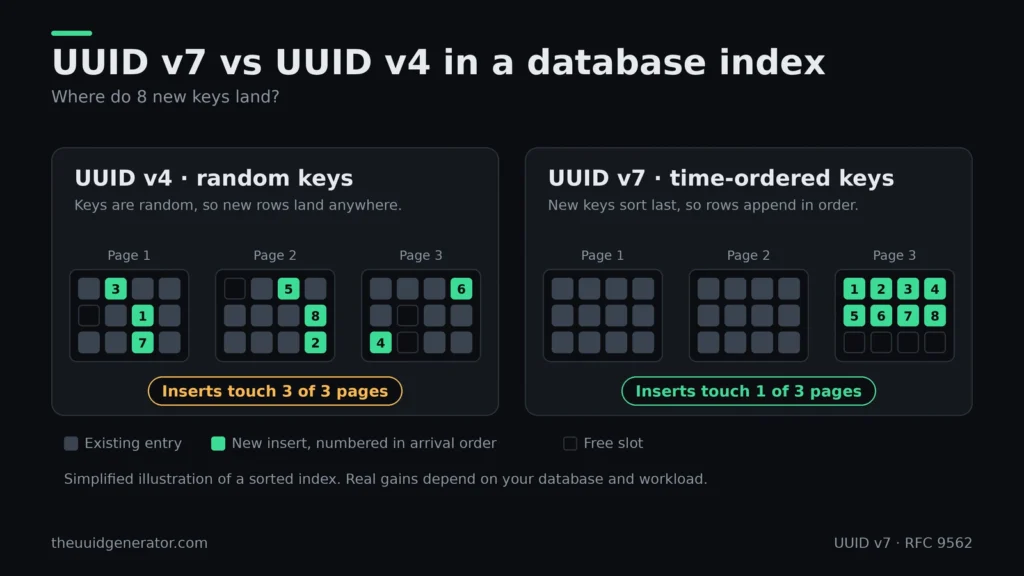
The timestamp is the trade-off. Anyone who sees a v7 value can work out when it was created. If that is a problem, for example in a public URL for a sensitive record, v4 is the safer choice.
If you are unsure, use v7 for internal records that benefit from order and v4 where the ID should reveal nothing. You can try both with the UUID v4 generator and the generator above.
UUID v7 vs UUID v6
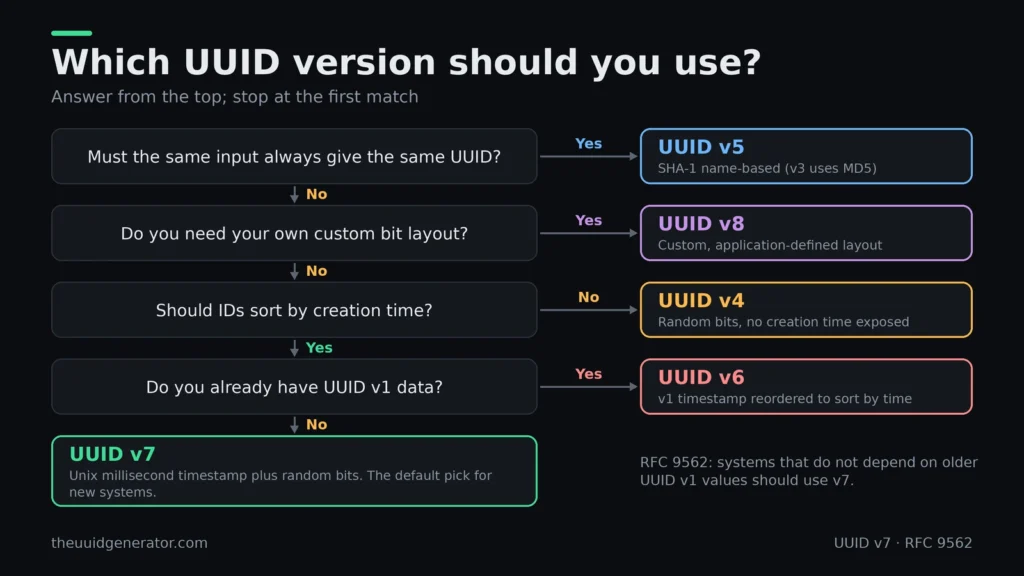
UUID v6 and UUID v7 are both time-ordered, so both sort by creation time. They get there in different ways. UUID v6 is the UUID v1 layout with its timestamp fields reordered, while UUID v7 is a newer design built on the Unix epoch.
RFC 9562 says systems that do not depend on older UUID v1 values should use v7. If you are starting a new project, v7 is the simpler choice.
Main Differences
|
UUID v6 |
UUID v7 |
|
|
Timestamp epoch |
Gregorian calendar, 15 October 1582 |
Unix epoch, 1 January 1970 |
|
Timestamp size |
60 bits |
48 bits |
|
Timestamp precision |
100-nanosecond intervals |
Milliseconds |
|
Other fields |
Clock sequence and node ID |
Random data, with optional counter bits |
|
Built from |
A reordered UUID v1 |
A new layout |
|
Best for |
Systems that already use UUID v1 |
New systems |
The timestamp is the biggest difference. A UUID v6 counts 100-nanosecond steps from 1582, which is hard to read without a conversion. A UUID v7 holds plain Unix milliseconds, the same time format most languages and databases already use.
UUID v6 also keeps the v1 node field, which can be a random value instead of a hardware address. UUID v7 has no node field. It fills the rest of the ID with random or counter bits.
When to Choose v6 or v7
When to Use UUID v6
Choose UUID v6 when you already have UUID v1 values and want the same data in an order that sorts by time. Because v6 uses the same timestamp as v1, you can convert between the two without losing information.
When to Use UUID v7
Choose UUID v7 for everything else. It is easier to read and decode, and it needs no clock sequence or node ID.
You can create both here: the generator above for v7, and the UUID v6 generator if you need to match a v1-based system.
UUID v7 vs ULID
UUID v7 and ULID solve the same problem: an identifier that is unique and sorts by creation time. Both are 128 bits, and both start with a 48-bit timestamp in milliseconds. They differ in how the value is written and in whether it counts as a UUID.
UUID v7 and ULID Differences
|
UUID v7 |
ULID |
|
|
Standard |
RFC 9562 |
Community specification |
|
Timestamp |
48-bit Unix milliseconds |
48-bit Unix milliseconds |
|
Random part |
About 74 bits, with optional counter bits |
80 bits |
|
Text form |
36 characters, hex with hyphens |
26 characters, Crockford Base32 |
|
Case |
Upper or lower case, both valid |
Case-insensitive |
|
Version and variant bits |
Yes |
No |
|
Native database type |
Works in UUID columns |
Usually stored as text or binary |
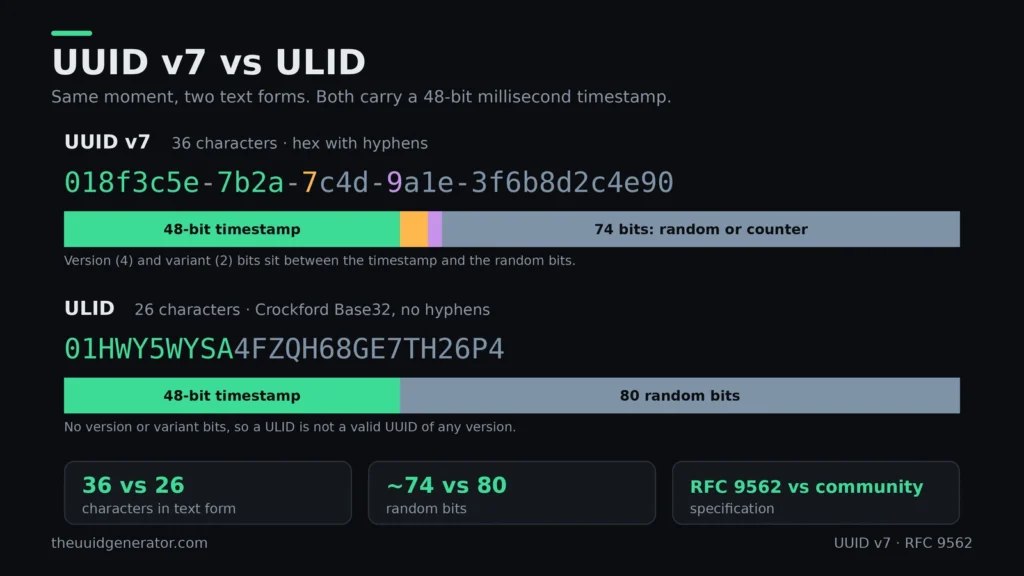
The text form is the difference you notice first. A ULID is shorter and has no hyphens, which some teams find easier to read and paste. A UUID v7 looks like every other UUID, so existing parsers, validators, and UUID columns accept it without changes.
ULID also has no version or variant bits. Its 16 bytes fit in a UUID column, but the value is not a valid UUID of any version, and tools that check the version will reject it.
Which One Should You Choose?
Pick v7 When
Choose UUID v7 if you want an IETF standard, native UUID support in your database and language, and compatibility with tools that already handle UUIDs. It is the safer pick for new systems built around UUIDs.
Pick ULID When
Choose ULID if you want a compact text ID and your stack already uses it. Moving an existing system from ULID to UUID v7 rarely pays off.
If you are unsure, start with UUID v7. You can generate one with the tool above and compare it with your current IDs.
Privacy and Browser-Based Generation
This generator creates UUID v7 values in your browser. The page shows a notice that says nothing is sent to any server, so the identifiers you generate stay on your device.
Browser-based generation matters when you create IDs for real projects. You can generate test keys, copy them, and close the tab without sharing a list of your identifiers with anyone.
The same applies to the options you choose. The custom time, quantity, format, and formatting settings all work on the page itself, so the values you pick are not passed along to build the result.
You can check this yourself. Open your browser’s developer tools, switch to the Network tab, and click Generate. You should see no new request carrying your UUIDs.
A UUID v7 also carries a timestamp, so treat it as a public value once you share it. Anyone who sees the ID can read when it was created. Keep that in mind when you use these values in URLs or other places others can see.
RFC 9562: The UUID v7 Standard
UUID v7 is defined in RFC 9562, published by the IETF in May 2024. It replaced RFC 4122, which never included version 7.
What RFC 9562 Changed
RFC 9562, written by K. Davis, B. Peabody, and P. Leach, is a Standards Track document that obsoletes RFC 4122. It added UUID versions 6, 7, and 8 alongside the older formats. Any source that cites RFC 4122 for v7 is out of date.
Why Time-Ordered UUIDs Were Added
Section 2.1 of the RFC explains the motivation. Random UUIDs such as v4 give poor index locality in databases. UUID v1 uses an unusual 1582 start date, and its values must be parsed before they can be sorted by time. v1 can also expose a MAC address. v7 answers these problems with a Unix timestamp at the front.
Where to Find It in the RFC
Read the full text at rfc-editor.org/rfc/rfc9562.
UUID v7 Programming Examples
Most languages can generate a UUID v7 in one line, from the standard library or a small package. Each example below creates an ID for the current time, with a custom-time version where the language supports it.
|
Language |
Call |
Needs |
Custom time |
|---|---|---|---|
|
JavaScript |
|
|
Yes, |
|
Python |
|
Python 3.14 or newer |
No |
|
Go |
|
|
No |
|
C# |
|
.NET 9 or newer |
Yes, |
|
Rust |
|
|
Via its |
|
PostgreSQL |
|
PostgreSQL 18 or newer |
Yes, shift interval |
|
MariaDB |
|
MariaDB 11.7 or newer |
No |
JavaScript
The uuid package takes a Unix time in milliseconds, so you can create an ID for any past or future moment.
import { v7 as uuidv7 } from 'uuid';

uuidv7();                                             // current time
uuidv7({ msecs: Date.UTC(2024, 4, 2, 22, 13, 19) });  // 2 May 2024, 22:13:19 UTC
Note that crypto.randomUUID() in browsers and Node.js only makes version 4 values.
Python
Python 3.14 added uuid.uuid7() to the standard library. It takes no time argument, so it always uses the current time.
import uuid
import uuid

uuid.uuid7()
On Python 3.13 or older, install a package such as uuid6 and use from uuid6 import uuid7.
Go
The google/uuid package returns an error value along with the ID, so check it before using the result.
import “github.com/google/uuid”
import "github.com/google/uuid"

id, err := uuid.NewV7()
C#
Pass a DateTimeOffset to build an ID for a specific time.
var now = Guid.CreateVersion7();
var past = Guid.CreateVersion7(new DateTimeOffset(2024, 5, 2, 22, 13, 19, TimeSpan.Zero));
Guid.ToByteArray() uses Microsoft byte order, so its bytes differ from the RFC 9562 order. The Byte order option in the generator above shows both.
Rust
Enable the v7 feature in Cargo.toml, then call now_v7().
// Cargo.toml: uuid = { version = "1", features = ["v7"] }
use uuid::Uuid;

let id = Uuid::now_v7();
PostgreSQL
PostgreSQL 18 has a built-in uuidv7(). The optional argument shifts the timestamp by an interval, which is handy for test data in the past.
SELECT uuidv7(); — now
SELECT uuidv7(INTERVAL ‘-7 days’); — one week ago
SELECT uuidv7();                      -- now
SELECT uuidv7(INTERVAL '-7 days');    -- one week ago

CREATE TABLE orders (
  id uuid PRIMARY KEY DEFAULT uuidv7()
);
MariaDB
MariaDB has UUID_v7() from version 11.7. MySQL has no built-in UUID v7 function, so generate the ID in your application.
SELECT UUID_v7();Check Your Output
Whichever language you use, the first 12 hex characters of the ID must match the timestamp you asked for. For 2 May 2024, 22:13:19 UTC, the ID should start with 018f3b5e-7c18.
To compare, pick the same time in the generator’s Custom time option and read the live bit breakdown. If the first group differs, your code is using a different clock or time zone.
How to Generate UUID v7 Online
To generate a UUID v7 online, choose Current time or Custom time, set the format you want, pick how many IDs you need, and press Generate UUIDs. Then copy the result or download it. Everything runs in your browser, so no ID is sent to a server.
Step 1: Copy Your First UUID v7
A fresh UUID v7 is already in the result box when the page loads. Click Copy and paste it wherever you need it. For another one, press New UUID, or hit R on your keyboard.
Step 2: Choose the Timestamp
Leave it on Current time to stamp the ID with this exact millisecond. Switch to Custom time to pick any date and time, which is handy for seeding test data or backfilling old records.
Step 3: Set the Ordering
Keep Monotonic on when you create many IDs at once. It keeps them in order even inside the same millisecond, so your sorted list never shuffles.
Step 4: Pick the Output Format
Standard gives the familiar 36-character form. URN, Base64, Base64 URL-safe,e and Hex (0x) suit APIs, links, and code. You can also switch on uppercase, remove hyphens, add braces, URL-encode the value, or wrap it in single or double quotes.
|
Style |
Result |
|---|---|
|
Standard |
|
|
Uppercase, no hyphens |
|
|
Braces |
|
|
URN |
|
Step 5: Select the Byte Order
Use Standard (RFC 9562) for almost everything. Choose Microsoft GUID only when the IDs are going into .NET or SQL Server, which read the first three groups in a different byte order.
Step 6: Set the Quantity and Separator
Choose 1, 10, 50, 100, 500, or 1,000 IDs. Then pick a separator: new line, comma, comma with a new line, space, or tab. A comma with double quotes pastes straight into a JSON array or a SQL IN list.
Step 7: Generate and Export
Press Generate UUIDs (or G) to create the batch. Copy the list, or download it as CSV, JSON, or SQL, depending on where it is headed next.
UUID v7 FAQ
A UUID v7 is 128 bits, which is 16 bytes. That is the UUID v7 size in binary form, and it is the same for every UUID version.
The UUID v7 length as text is 36 characters in the standard hyphenated form, or 32 hexadecimal characters without hyphens. The same figures apply to uuidv7 length, uuid7 length, and uuidv7 size, since these are different spellings of one format.
Yes. The first 48 bits of a UUID v7 hold a Unix timestamp in milliseconds, so you can read the creation time straight from the value.
To decode it by hand:
- Remove the hyphens and take the first 12 hex digits.
- Convert them from hexadecimal to a decimal number. This is the Unix time in milliseconds.
- Convert that number to a date in UTC.
For example, 018f3c5e-7b2a-7c4d-9a1e-3f6b8d2c4e90 starts with 018f3c5e7b2a, which is 1,714,704,775,978 ms, or 2024-05-03 02:52:55.978 UTC.
No. A UUID v7 sorts by its timestamp, but strict ordering within the same millisecond is not guaranteed by the format alone.
RFC 9562 describes optional methods, such as counters, that a generator can use to keep values in order. Whether you get that behavior depends on the generator, so check how yours works if order within a millisecond matters.
Use UUID v7 when you want identifiers that sort by creation time, such as database keys and logs. Use UUID v4 when the ID should be random and reveal nothing about when it was created.
Use UUID v6 only if you already have UUID v1 data and want a time-sortable version of it. For a closer look, read the comparisons above or try the UUID v4 generator and UUID v6 generator.
RFC 9562 defines UUID v7. It is the current UUID specification and replaces RFC 4122.
RFC 4122 is still worth knowing for historical reasons, since it defined the older versions, but it does not define UUID v7.
Yes. The first 48 bits of a UUID v7 hold a Unix timestamp in milliseconds, which is the first 12 hex characters. Anyone can decode it to see when the ID was created.
Yes. Remove the hyphens, take the first 12 hex characters, and convert them to a decimal number. That number is the Unix time in milliseconds, which you then convert to a date.
For example, 018f3b5e7c1a becomes 1714687999002, which is 2 May 2024, 22:13:19 UTC. In JavaScript: new Date(parseInt("018f3b5e7c1a", 16)).
Yes in practice. IDs made in the same millisecond only collide if all 74 random bits match, which is extremely unlikely. Uniqueness is still probabilistic, so keep a unique constraint in your database.
UUID v7 is safe to use as an identifier, but it is not a secret. Anyone who sees the ID can read its creation time to the millisecond. Do not use it as a password reset link, session ID or API key.
In most cases, yes. Its time-ordered start keeps new rows near the end of the index, and it can be created in your app before the INSERT. Store it as a 16-byte uuid or BINARY(16) where possible, and avoid it if the creation time of a record must stay hidden.
Yes. It is specified in Section 5.7 of RFC 9562, published in May 2024, which replaced RFC 4122.
For new projects, yes. It keeps the sorting benefit of v6 but removes the MAC-based node field that v6 inherited from v1.
It can. The node field may hold a MAC address, though RFC 9562 also allows a random value there. Check how your library fills it.
Not directly. They encode time differently and v6 includes a node field that v7 doesn’t, so each new ID has to be generated fresh in its target format.
PostgreSQL 18 and MariaDB 11.7 include built-in functions. Other databases store v7 in their usual UUID or BINARY(16) column, with the ID generated in application code.
Yes, but old ULIDs will not become valid v7 values. Most teams keep the old IDs and generate v7 for new records.
No. It is a community specification, while v7 is defined in an IETF RFC.
Yes, 26 characters against 36. Both carry the same 128 bits, so the difference is only in text form.
No. RFC 4122 only covered the older versions. UUID v7 first appears in RFC 9562, which replaced it in May 2024.