
UUID v3 Generator – Create Bulk Namespace-Based UUIDs Online
Our UUID v3 Generator creates name-based UUIDs using MD5 hashing and a namespace and name. Use this UUID3 Generator to create a single UUID or generate up to 1,000 UUIDs in bulk. Customize the output format and style, then copy your results or download them in TXT, CSV, JSON, or SQL formats.
Shortcuts: C copy · R generate · G generate bulk
What Is a UUID v3?
A UUID v3 (Universally Unique Identifier version 3), also known as a type 3 UUID, is a name-based identifier generated using the MD5 hashing algorithm. Unlike randomly generated UUIDs, a v3 UUID is created from two inputs: a namespace and a name.
The namespace provides a defined context for the name, while the name is the value used to generate the identifier. UUID v3 combines these inputs and applies MD5 hashing to produce a 128-bit UUID with the version and variant bits set according to the UUID specification.
A key feature of UUID3 is its deterministic nature. If you generate a UUID using the same namespace and name, you will always get the same result. Changing either input produces a different hash and generally a different UUID. This makes UUID v3 useful when you need consistent identifiers for the same names across different systems or applications.
How to Use a UUID Generator v3 Online
Our UUID Generator v3 makes it easy to create name-based UUIDs using a namespace and a name. You can generate a single UUID or process up to 1,000 names in one bulk operation.
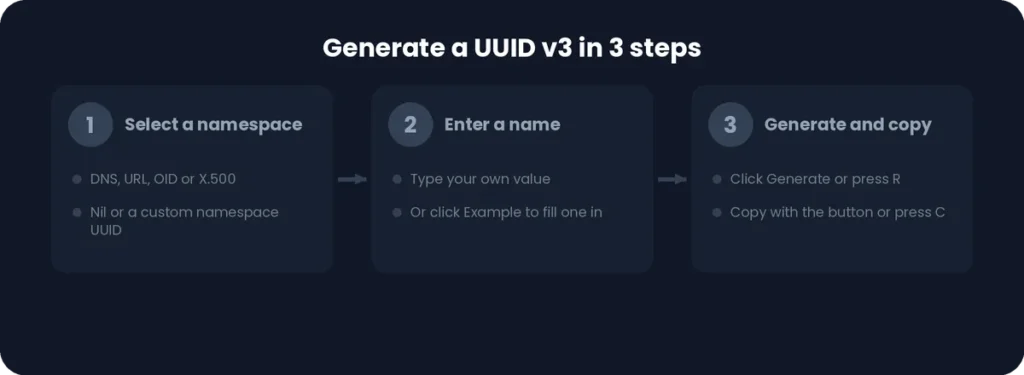
Select a Namespace
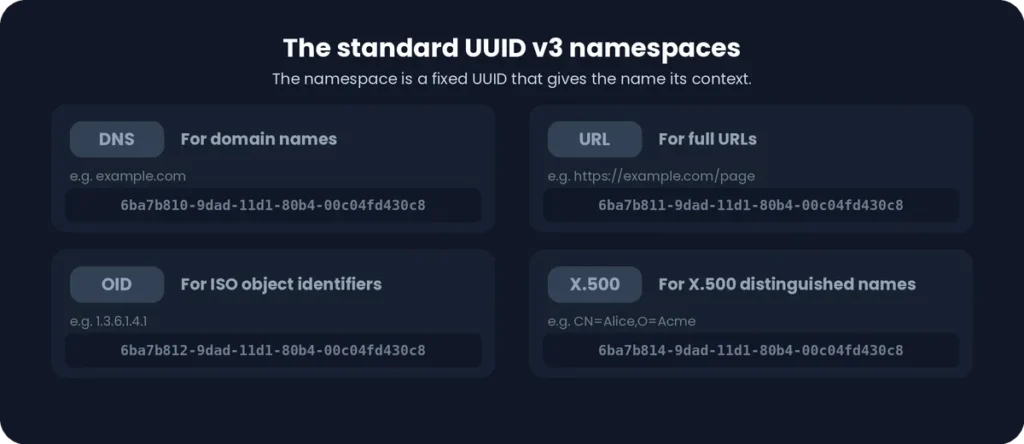
A namespace defines the context used to generate a name-based UUID. Select an option from the namespace dropdown. For example, the tool displays DNS as the selected namespace. The chosen namespace is combined with your input name to determine the generated UUID.
Enter a Name
Enter your desired value in the Name field. This value is used with the selected namespace to generate a UUID through MD5 hashing. If you want to test the tool, click the Example button to populate the field with a sample name.
Generate and Copy Your UUID
Click the Generate button to create a UUID v3 using your selected namespace and name. Once the result appears, use the individual Copy option to copy it.
You can also use these keyboard shortcuts:
- C: Copy the generated UUID.
- R: Generate a UUID.
Generate Multiple UUIDs in Bulk
Use the bulk generation feature of this UUID 3 Generator to create identifiers for multiple names. Enter your names in the bulk input field, placing one name per line. You can process up to 1,000 names in a single batch.

Choose your preferred separator option to organize the results, then click Generate UUIDs to create a corresponding UUID for each input name. You can also press G to start bulk generation.
UUID v3 Output and Download Options
After generating UUIDs, you can easily copy or download your results for use in other applications, projects, or databases. The tool provides a one-click copy option for all generated UUIDs and supports four download formats: TXT, CSV, JSON, and SQL.
Copy All Generated UUIDs
Use the Copy All option to copy every generated UUID in one click instead of copying identifiers individually. This is especially useful when working with bulk-generated UUIDs, saving time when transferring multiple results into another application, document, or development project.
Download UUIDs in Different Formats
Download your generated UUIDs in the format that best fits your workflow. The generator supports four export options:
- TXT: Save UUIDs as a plain text file for simple storage and sharing.
- CSV: Export UUIDs in a comma-separated format for spreadsheets and data processing.
- JSON: Download structured UUID data for applications and software workflows.
- SQL: Export UUIDs in an SQL-compatible format for database-related tasks.
Choose TXT, CSV, JSON, or SQL to download your generated results in a format suitable for your application, data management process, or database workflow.
UUID v3 Format and Customization Options
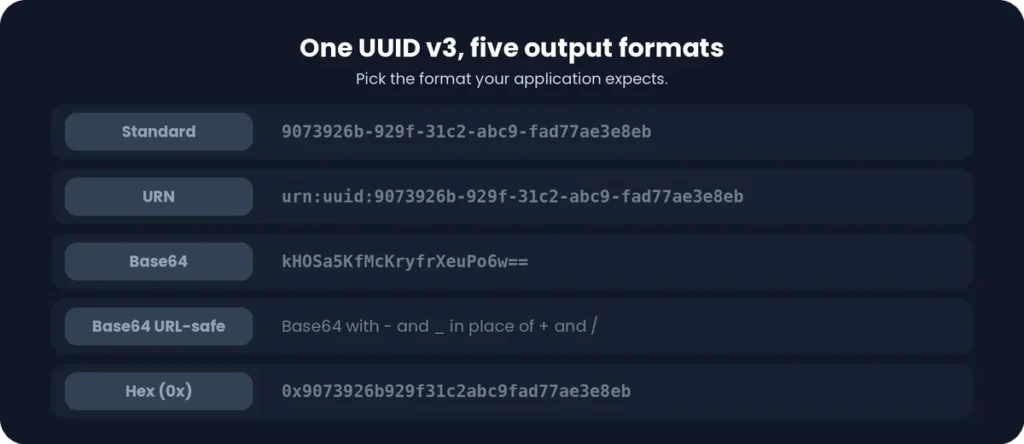
The UUID v3 generator offers multiple output formats and style settings, allowing you to adjust how generated identifiers are displayed and exported. You can choose from five output formats and customize the appearance using options such as uppercase letters, hyphens, braces, URL encoding, and quotation marks.
UUID v3 Output Formats
Choose the output format that best suits your application or development workflow. The tool provides five options:
- Standard: Displays the UUID in its conventional hexadecimal format with hyphens.
- URN: Represents the UUID as a Uniform Resource Name using the urn:uuid: prefix.
- Base64: Encodes the UUID into Base64 representation for compact data handling.
- Base64 URL-safe: Uses a URL-safe Base64 representation suitable for use in URLs and web applications.
- Hex (0x): Displays the UUID as hexadecimal data with a 0x prefix.
UUID v3 Style Options
Customize the appearance of your generated UUID using the available style controls:
- Uppercase: Converts hexadecimal letters to uppercase.
- Hyphens: Controls whether hyphens appear between UUID segments.
- Braces: Wraps the UUID in curly braces.
- URL-encode: Encodes the UUID for use in URL-related contexts.
- Quotes: Wraps the generated UUID in quotation marks.
These settings help adapt the UUID output to different formatting requirements, programming environments, and application workflows.
UUID v3 Byte Order
The tool interface also displays a Byte Order option with Standard (RFC 9562) as its listed setting. This option is currently disabled in the generator interface, so users cannot change the byte order through this control at present.
RFC 9562 defines the standard UUID format and its byte representation. The disabled state means this setting is displayed for reference but is not currently available as an interactive customization option.
UUID v3 Byte Order
The tool interface also displays a Byte Order option with Standard (RFC 9562) as its listed setting. This option is currently disabled in the generator interface, so users cannot change the byte order through this control at present.
RFC 9562 defines the standard UUID format and its byte representation. The disabled state means this setting is displayed for reference but is not currently available as an interactive customization option.
How Does UUID v3 Generation Work?
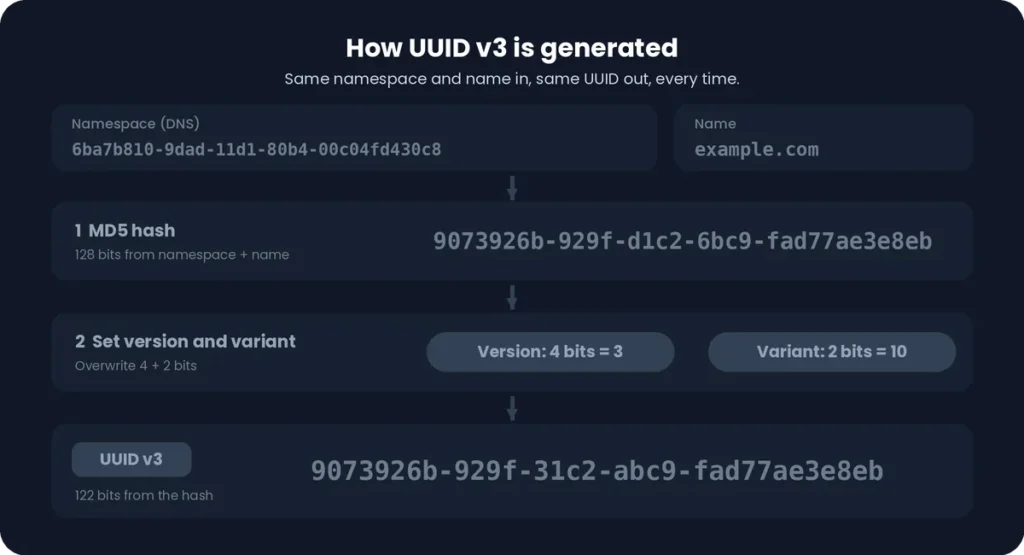
A UUIDv3 is generated by applying the MD5 hashing algorithm to a namespace and a name. This process converts the input values into a 128-bit identifier with specific version and variant bits. A Version 3 UUID Generator follows this process to produce consistent, name-based identifiers whenever the same namespace and name are provided.
Namespace and Name-Based Generation
UUID v3 generation starts with two inputs: a namespace and a name. The namespace identifies the context in which the name is used, while the name provides the value from which the UUID is generated.
The generator combines the namespace’s 128-bit UUID value with the name data before applying the hashing algorithm. Both inputs affect the final result, which means changing either the namespace or the name generally produces a different UUID.
For example, the same name used with the DNS namespace and another namespace will produce different UUIDs. However, using the same namespace and name again will reproduce the same identifier.
MD5 Hashing in UUID v3
UUID v3 uses MD5 (Message-Digest Algorithm 5) to generate a hash from the combined namespace and name data. MD5 produces a 128-bit hash, which provides the initial value used to construct the UUID.
After hashing, specific bits are modified to identify the UUID version and variant. The remaining hash-derived bits are retained as part of the final identifier. This process makes UUID v3 deterministic because identical inputs produce the same hash and, consequently, the same UUID.
UUID v3 Version and Variant Bits
A UUID contains 128 bits, divided into fields that identify its version, variant, and remaining hash-derived data. In UUID v3, the version and variant bits are set according to the UUID specification.
The tool’s visual UUID breakdown shows the following bit distribution:
- MD5 Hash: 122 bits – The hash-derived bits retained after reserving the version and variant fields.
- Version: 4 bits – Identifies the UUID as version 3. Its hexadecimal version indicator is 3.
- Variant: 2 bits – Identifies the UUID layout variant. For the standard RFC UUID variant, these bits are 10.
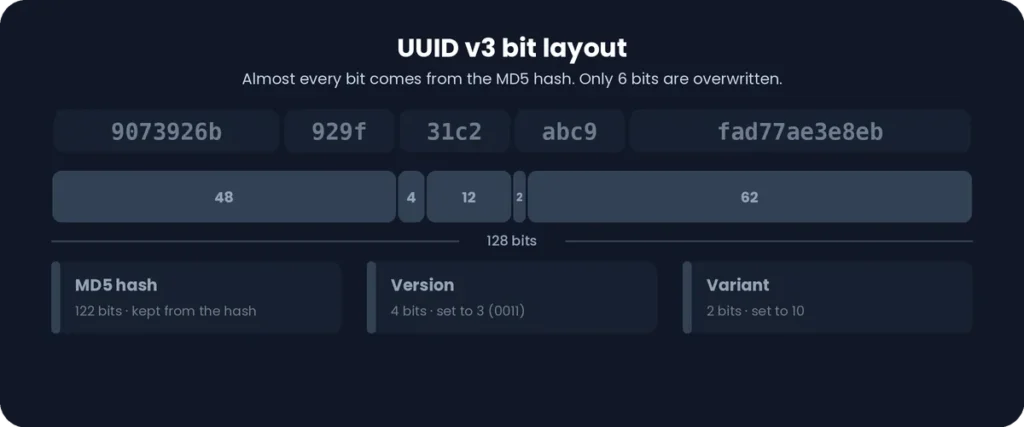
Together, these fields make up the complete 128-bit UUID v3 structure. The version and variant bits ensure that the generated identifier follows the required UUID format while preserving the remaining data derived from the MD5 hash.
Is UUID v3 Deterministic?
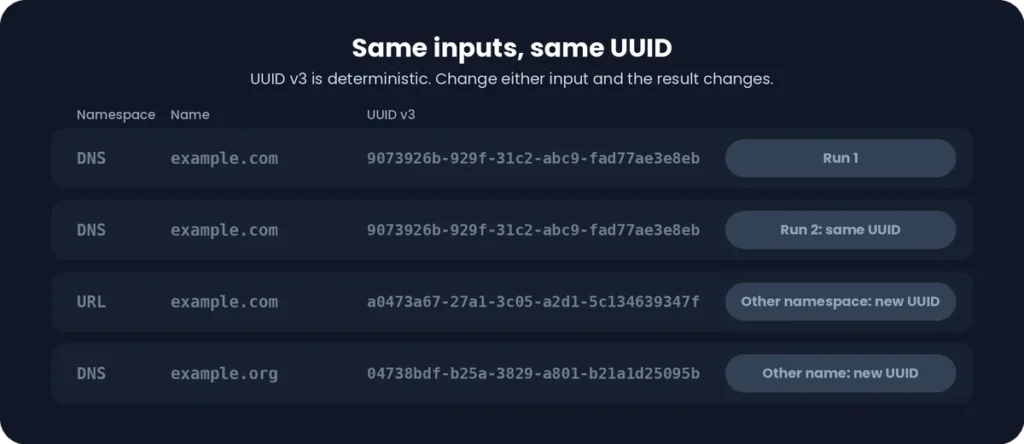
Yes, UUID v3 generation is deterministic, meaning the same input values always produce the same UUID. Because it uses a namespace and name with the MD5 hashing algorithm, you can generate an identical identifier whenever you provide the same inputs. This makes UUID v3 useful for applications that require consistent and repeatable identifiers.
Same Namespace and Name Produce the Same UUID
When you generate a UUID v3 using a specific namespace and name, the result remains the same every time you repeat the process. For example, generating a UUID with the DNS namespace and the name example.com will produce the same identifier whenever those exact inputs are used again.
Changing the Namespace or Name Changes the Result
Both the namespace and name affect UUID v3 generation. If you change either input, the resulting hash and UUID will generally be different. For example, using the same name with a different namespace produces a different UUID. Similarly, changing the name while keeping the namespace unchanged generates another identifier.
Why Are Repeatable UUIDs Useful?
Deterministic UUIDs are useful when applications need to identify the same resource consistently across different systems or operations. Common benefits include:
- Consistent identification: Generate the same identifier for the same input without storing or manually reusing an earlier UUID.
- Data deduplication: Helps identify repeated records when the same namespace and name are used.
- Cross-system consistency: Generate matching identifiers across applications that use the same namespace, name, and UUID v3 algorithm.
- Repeatable data processing: Maintain consistent identifiers when importing, processing, or synchronizing data.
This predictable behavior makes UUID v3 suitable for applications that need reproducible identifiers rather than a new random UUID every time.
UUID v3 Use Cases
UUID v3 is useful when applications need consistent identifiers generated from names rather than random values. Because it uses a namespace and name to produce a deterministic UUID, the same inputs can generate matching identifiers across repeated operations and compatible systems.
Creating Consistent Identifiers for Names
UUID v3 can convert names, domain names, usernames, or other text values into consistent identifiers. By using the same namespace and input name, you can generate the same UUID whenever needed. This is useful when a system needs to associate a stable identifier with a particular name without creating a new random value each time.
Generating Repeatable IDs for Applications
Applications can use UUID v3 to generate predictable identifiers for resources based on their input values. For example, different application instances can independently generate the same UUID when they use an identical namespace and name. This helps maintain consistency when processing the same data across multiple operations or services.
Using Namespace-Based UUIDs in Databases and Systems
UUID v3 can support database and system workflows that benefit from repeatable identifiers. Common examples include:
- Data imports: Generate consistent identifiers when importing the same named records more than once.
- Data deduplication: Helps recognize records associated with identical namespace and name inputs.
- System synchronization: Generate matching identifiers across compatible systems processing the same source data.
- Resource mapping: Associate names or external references with predictable identifiers in an application.
These use cases matter most when repeatability matters. However, UUID v3 is not a replacement for every database-generated ID or a guarantee that different names will never produce a collision.
UUID v3 vs UUID v5
UUID v3 and UUID v5 are both name-based UUID versions that generate deterministic identifiers from a namespace and name. The main difference is the hashing algorithm: UUID v3 uses MD5, while UUID v5 uses SHA-1.
|
Feature |
UUID v3 |
UUID v5 |
|
Generation method |
Name-based |
Name-based |
|
Hash algorithm |
MD5 |
SHA-1 |
|
Deterministic |
Yes |
Yes |
Both versions produce the same UUID when given the same namespace and name. However, they use different hashing algorithms, so their generated identifiers are different.
If you need to generate SHA-1-based name UUIDs, visit our UUID v5 Generator page to learn more and create UUID v5 identifiers.