
UUID v2 Generator – Generate DCE Security UUIDs Online
Our UUID v2 Generator creates DCE Security UUIDs online in a few clicks. Need one ID or a full batch? This uuid2 generator handles both.
UUID v2 is also known as a DCE Security UUID. It is a variant of the time-based UUID v1 that embeds a local ID and a domain, such as a user, group, or organization, directly into the identifier.
Unlike a basic uuid2 tool, you control every field. Set a custom domain, local ID, timestamp, node ID, and clock sequence to match your system. Generate a single UUID or create them in bulk.
Once your UUID 2 values are ready, copy them instantly or export them as TXT, CSV, JSON, or SQL.
Shortcuts: C copy · R new uuid · G generate bulk
Generate UUID v2 Online
Use the tool below to create DCE Security UUIDs in seconds. Pick a domain, set your local ID, timestamp, node ID, and clock sequence, then generate one UUID or up to 1,000.
Each result comes with color-coded fields and a full information panel, so you can see exactly what is inside your UUID.
|
Tool component |
What it does |
|
Generated UUID |
Displays your generated UUID v2 |
|
Generate controls |
New UUID and Copy buttons |
|
UUID visualization |
Shows color-coded UUID fields |
|
Domain |
Lets you select the supported DCE domain |
|
Local ID |
Lets you enter a custom local identifier |
|
Timestamp |
Current timestamp, custom timestamp, Unix milliseconds, and timezone |
|
Node ID |
Random private node ID, new random node ID per UUID or custom MAC address |
|
Clock sequence |
Random or custom clock sequence |
|
Output formats |
Standard, URN, Base64, Base64 URL-safe and Hex (0x) |
|
Formatting options |
Uppercase, hyphens, braces, URL encoding and quotes |
|
Bulk generation |
Generates 1–1,000 UUIDs at once |
|
Bulk controls |
Quantity presets, separator, Generate, Copy All and Clear |
|
Export options |
Download as TXT, CSV, JSON or SQL |
|
UUID information |
Version, variant, local ID, domain, clock sequence, node metadata, time window and Gregorian ticks |
|
Keyboard shortcuts |
C to copy, R for a new UUID, and G for bulk generation |
What Is UUID v2 (DCE Security UUID)?
UUID v2 is the second version of the UUID standard, also called a DCE Security UUID. DCE stands for Distributed Computing Environment, an older framework that used these IDs to tie an identifier to a user, group, or organization.
Like UUID v1, a uuid2 value is built from a timestamp, a clock sequence, and a node ID. The difference is that it also carries a local identifier and a domain field.
Random UUIDs, such as v4, contain no meaning at all. A UUID 2 value does: it records who the ID belongs to (the local ID) and what kind of owner that is (the domain).
The domain is one of three values: person, group, or organization. For example, a person domain can hold a user ID, while a group domain can hold a group ID.
If you want to try it yourself, our uuid2 generator lets you set both fields and see the result instantly.
UUID v2 Example and Standard Format
Here is a sample UUID v2:
000003e8-8f2a-21ef-8b00-3b5c9d2e71b4
A UUID 2 uses the standard 36-character format: 32 hexadecimal digits split by four hyphens into groups of 8-4-4-4-12.
Here is how to read this uuid2 example:
|
Part |
Value |
Meaning |
|
Local identifier |
000003e8 |
Decimal 1000, such as a user ID |
|
Version |
2 (first digit of the third group) |
Marks it as UUID v2 |
|
Variant |
8 (first digit of the fourth group) |
Standard RFC variant |
|
Domain |
00 (last two digits of the fourth group) |
Person domain |
|
Node ID |
3b5c9d2e71b4 |
Private random node |
The local identifier always sits in the first group, written as a plain hexadecimal number.
UUID v2 Structure and Bit Layout
A UUID v2 is 128 bits long. The UUID v2 structure is split into these fields:
|
Field |
Bits |
|
Local identifier |
32 |
|
Remaining timestamp |
28 |
|
Version |
4 |
|
Variant |
2 |
|
Clock sequence |
6 |
|
Domain |
8 |
|
Node ID |
48 |
|
Total |
128 |
Visually, the example above breaks down like this:
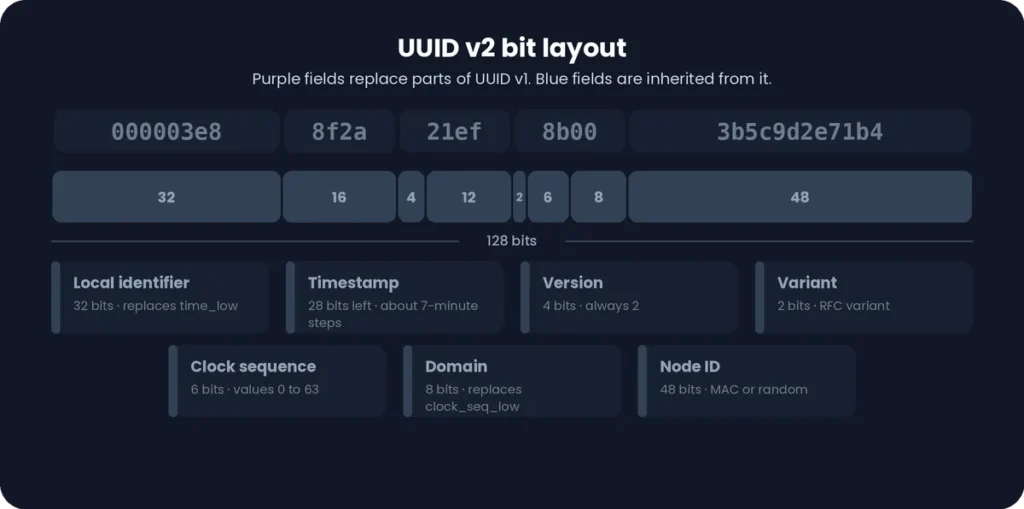
000003e8 (local ID) – 8f2a + 1ef (remaining timestamp) – 2 (version) – 8b (variant + clock sequence) – 00 (domain) – 3b5c9d2e71b4 (node ID)
The key change from UUID v1 is simple. UUID v2 replaces the low 32 bits of the timestamp with the local identifier, and it uses the last clock sequence byte as the domain field.
Because of this, the timestamp in a uuid2 value is much coarser. Each timestamp step covers about 7 minutes, and the clock sequence is only 6 bits.
How Does UUID v2 Work?
A DCE Security UUID is built from five parts: a local identifier, a domain, timestamp information, a clock sequence, and a node ID.
First, the local identifier takes the place of the low 32 bits of the timestamp. The remaining timestamp bits, the clock sequence, and the node ID work much like they do in UUID v1.
Then the domain is stored in the last clock sequence byte. It tells you what kind of owner the local identifier belongs to.
Put together, a uuid2 value answers two questions: when was it created, and who does it belong to?
Our uuid2 generator handles this for you. Enter your values, and the tool assembles a valid UUID 2 for the tasks you need, such as tagging a user, group, or organization.
DCE Security and Local Identifiers
DCE stands for Distributed Computing Environment. It was a framework from the early 1990s for building networked systems, and it needed IDs that carried security information.
A DCE Security UUID solved this by embedding a local identifier inside the UUID itself. The local identifier is a number that points to something in the local system, such as a user account or a group.
This is why UUID v2 is tied to DCE-based systems. It was designed to identify local users and groups inside those environments.
UUID v2 is a legacy version. It is rarely used in modern applications. For new projects, UUID v4 or UUID v7 is usually the better choice.
UUID v2 Domain: Person, Group and Organization
The UUID v2 domain is an 8-bit field. It tells you what the local identifier refers to.
The three domain concepts are:
|
Domain |
What the local ID represents |
|
Person |
A user, such as a POSIX user ID |
|
Group |
A group, such as a POSIX group ID |
|
Organization |
An organization or other site-defined entity |
The same local ID number can mean different things.
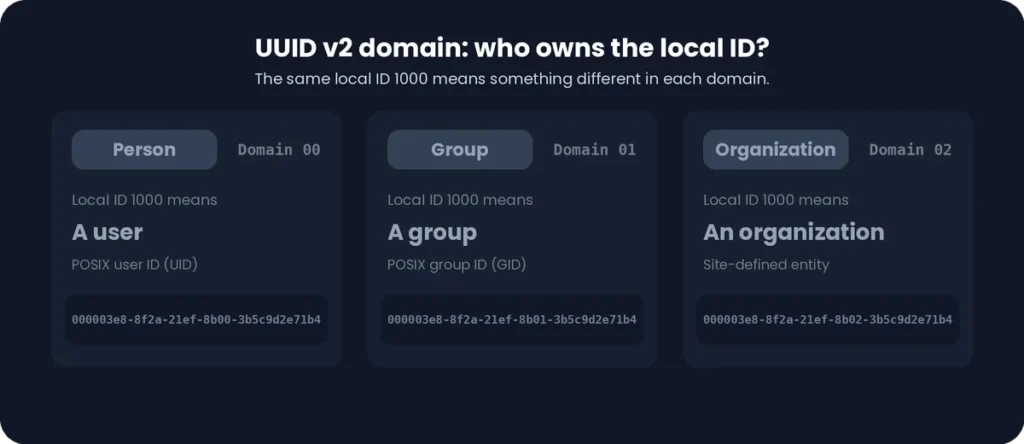
For example, 1000 in the Person domain is a user, while 1000 in the Group domain is a group. The domain removes that confusion.
In our generator, use the Domain selector to choose the supported domain. The UUID updates with your choice, and the UUID information panel shows the selected domain.
UUID v2 Local ID: POSIX User ID and Group ID
The UUID v2 local ID is a 32-bit number stored in the first group of the UUID. It is the main value that sets a DCE Security UUID apart from UUID v1.
On POSIX systems such as Linux and macOS, every account has a user ID (POSIX UID), and every group has a group ID (POSIX GID). The Person domain usually uses a UID, and the Group domain usually uses a GID.
Because the field is 32 bits, valid values run from 0 to 4,294,967,295. In hexadecimal, that is 00000000 to FFFFFFFF.
To set your own value, type a number into the Local ID field of the generator. The first group of the UUID changes to match it, and the same value appears in the UUID information panel.
UUID v2 Timestamp, Node ID and Clock Sequence
Three technical components shape every uuid2 value: the timestamp, the node ID, and the clock sequence.
The UUID v2 timestamp records when the UUID was created. The UUID v2 node ID identifies the machine that created it. The UUID v2 clock sequence keeps values unique if the clock moves backward or the node changes.
Together with the local ID and domain, these parts make a complete DCE Security UUID. Our generator lets you control each one.
How UUID v2 Timestamp and Gregorian Ticks
Long Is a UUID?
The UUID v2 timestamp counts time in Gregorian ticks. One tick is 100 nanoseconds, counted from 15 October 1582, the start of the Gregorian calendar.
UUID v2 keeps only a reduced timestamp field. The low 32 bits are replaced by the local ID, so only the upper 28 bits remain. As a result, each step in a uuid2 timestamp covers about 7 minutes.
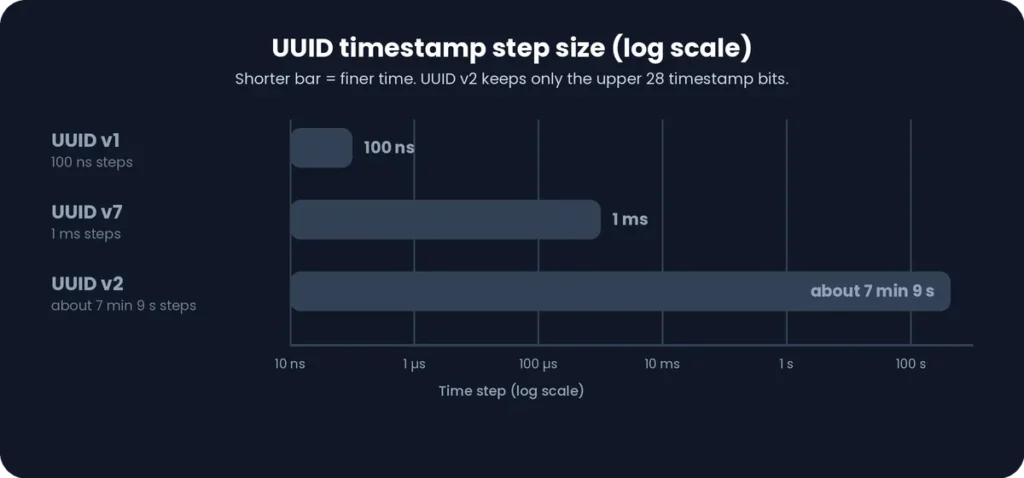
Our tool gives you these timestamp options:
|
Option |
What it does |
|
Current timestamp |
Uses the present date and time |
|
Custom timestamp |
Lets you pick a specific date and time |
|
Unix milliseconds |
Lets you enter a Unix time in milliseconds, which the tool converts to Gregorian ticks |
|
Timezone |
Sets the timezone used for your custom date and time |
UUID timestamps are based on UTC, so the timezone option only changes how you enter and view the time.
UUID v2 Node ID and MAC Address
The node ID is a 48-bit field at the end of the UUID. In the original design, it held the MAC address of the machine’s network card.
Using a real MAC address can reveal hardware information. For this reason, most tools use a random private node ID instead. A random node ID has its multicast bit set, which marks it as not being a real MAC address.
The generator supports three node ID modes:
- Random private node ID: one random node ID is used for your UUIDs.
- New random node ID per UUID: every UUID gets its own random node.
- Custom MAC address: enter your own MAC address as the node.
Privacy note: a MAC-based node ID can identify a device. Use a random node ID unless you specifically need a real MAC address.
UUID v2 Clock Sequence
The clock sequence helps prevent duplicate UUIDs. If the system clock is set back or the node ID changes, a new clock sequence keeps the new UUID different from older ones.
In our uuid2 generator, you can pick one of two modes:
- Random: the tool picks a clock sequence for you.
- Custom: you enter your own value.
The UUID v2 clock sequence is only 6 bits long, so it holds values from 0 to 63. This is smaller than in UUID v1, because UUID v2 uses the other byte of the clock sequence for the domain.
How to Generate a UUID v2 Online
Our uuid2 generator makes it easy to generate a UUID v2 online. Follow these steps to create a valid UUID 2 in under a minute:
- Choose the domain and enter your local ID.
- Set the timestamp, node ID, and clock sequence.
- Generate, copy, and inspect your UUID.
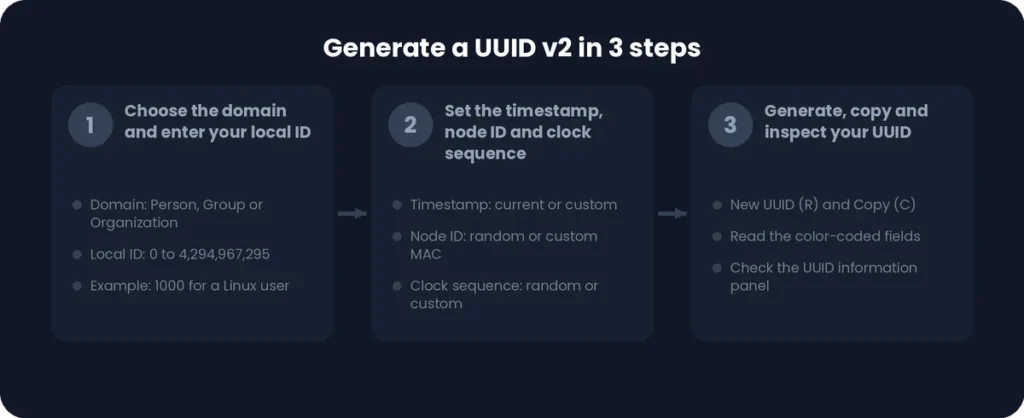
Each step is explained below.
Configure the UUID v2 Domain and Local ID
Start with the Domain selector. Choose the domain that matches what your local ID represents, such as a person or a group.
Next, type your number into the Local ID field. For example, enter 1000 for a typical Linux user ID.
The first part of the UUID updates right away to show your local ID.
Set the Timestamp, Node ID and Clock Sequence
Now fine-tune the remaining settings. Leave them on their defaults if you just need a quick UUID v2.
|
Setting |
Options |
|
Timestamp |
Current timestamp or a custom timestamp |
|
Unix milliseconds |
Enter a Unix time in milliseconds instead of picking a date |
|
Timezone |
Choose the timezone for your custom date and time |
|
Node ID |
Random private node ID, a new random node ID per UUID, or a custom MAC address |
|
Clock sequence |
Random or custom |
Use a random node ID if you want to avoid exposing a real MAC address. Use a custom value only when you need repeatable results.
Generate, Copy and Inspect Your UUID v2
Click New UUID to generate your value. You can also press R on your keyboard.
Click Copy to copy the UUID. You can also press C.
Then check the color-coded structure. Each color marks a different field, so you can see the local ID, timestamp, version, clock sequence, domain, and node ID at a glance.
Finally, open the UUID information panel. It shows the version, variant, local ID, domain, clock sequence, node metadata, time window, and Gregorian ticks. Use it to confirm that your UUID v2 matches the settings you chose.
Need many values? The bulk generator comes next.
UUID v2 Output Formats and Formatting Options
A generated uuid2 value can be shown in several ways. The UUID v2 output formats change how the value is encoded, while the UUID v2 formatting options change how it looks.
Pick the style that fits your code, database, or URL. The identifier itself stays the same.
Standard, URN, Base64, Base64 URL-safe and Hex Formats
Here is the same sample UUID v2 in each output format:
|
Format |
Example |
Best for |
|
Standard |
000003e8-8f2a-21ef-8b00-3b5c9d2e71b4 |
Databases, APIs and everyday use |
|
URN |
urn:uuid:000003e8-8f2a-21ef-8b00-3b5c9d2e71b4 |
XML, RDF, and systems that need a URN |
|
Base64 |
AAAD6I8qIe+LADtcnS5xtA== |
Compact storage and data transfer |
|
Base64 URL-safe |
AAAD6I8qIe-LADtcnS5xtA== |
URLs, filenames and tokens |
|
Hex (0x) |
0x000003e88f2a21ef8b003b5c9d2e71b4 |
Code, binary data and low-level work |
Standard is the 36-character format most people know. URN adds a urn:uuid: prefix so the value can be used as a formal identifier.
Base64 shortens the UUID to 24 characters. The URL-safe version swaps + and / for – and _, so it can sit safely inside a link.
Hex (0x) removes the hyphens and adds a 0x prefix, which is handy in programming languages.
Uppercase, Hyphens, Braces, URL Encoding and Quotes
Formatting options change how the UUID is displayed. They never change the underlying 128-bit value, so it is still the same UUID.
|
Option |
What it does |
Example |
|
Uppercase |
Shows letters as capitals |
000003E8-8F2A-21EF-8B00-3B5C9D2E71B4 |
|
Hyphens |
Turns the hyphens on or off |
000003e88f2a21ef8b003b5c9d2e71b4 |
|
Braces |
Wraps the UUID in curly braces |
{000003e8-8f2a-21ef-8b00-3b5c9d2e71b4} |
|
URL encoding |
Encodes special characters for use in URLs |
%7B000003e8-8f2a-21ef-8b00-3b5c9d2e71b4%7D |
|
Quotes |
Wraps the UUID in quotation marks |
“000003e8-8f2a-21ef-8b00-3b5c9d2e71b4” |
Braces are common in Windows and .NET code. Quotes are useful when pasting a value into code, JSON, or SQL.
You can combine options. For example, turn on uppercase and braces together to match your system’s style.
Bulk UUID v2 Generation and Export
Need more than one value? Our uuid2 generator can generate multiple UUIDs in a single step, from 1 up to 1,000.
Once they are ready, copy them all at once or use the UUID v2 export options to save them as TXT, CSV, JSON, or SQL.
Generate Multiple UUID v2 Values
The bulk section of the tool works in a few simple steps:
- Enter a quantity between 1 and 1,000, or pick a preset: 1, 10, 50, 100, 500, or 1,000.
- Choose a separator, which sets how the values are split in the results, for example, by a new line or a comma.
- Click Generate (or press G) to create your list.
- Click Clear to empty the results and start again.
The bulk generator uses the settings you chose above, including the domain, local ID, timestamp, node ID, and clock sequence. Turn on “new random node ID per UUID” if you want every value in the batch to have its own node.
Your output format and formatting options also apply, so the whole list matches your chosen style.
Copy All and Export UUID v2 Results
Click Copy All to copy the full list to your clipboard in one step.
To save the list, export it in the format you need:
|
Export format |
Useful for |
|
TXT |
Saving a simple list, or pasting values into notes and tickets |
|
CSV |
Opening in Excel or Google Sheets, or importing records into other tools |
|
JSON |
Test data, API requests, and config files |
|
SQL |
Database scripts, such as inserting generated IDs into a table |
For example, use CSV to hand a list to a teammate, or SQL to seed a test database without writing the statements by hand.
UUID v2 vs UUID v4 – What’s the Difference?
Choosing between UUID v2 and UUID v4 comes down to one question: do you need an ID that carries meaning, or one that is simply random?
A uuid2 value is built from a local ID, a domain, a timestamp, a clock sequence,e and a node ID. A UUID v4 is built almost entirely from random bits. If you are comparing uuid 2 vs 4, the sections below break down the differences in structure and use.
UUID v2 vs UUID v4 Structure
|
Feature |
UUID v2 |
UUID v4 |
|
Main design |
DCE Security fields |
Random bits |
|
Local identifier |
Yes, 32 bits |
No |
|
Domain |
Yes, 8 bits |
No |
|
Timestamp information |
Yes, reduced to 28 bits |
No |
|
Node ID |
Yes, 48 bits |
No |
|
Clock sequence |
Yes, 6 bits |
No |
|
Randomness |
None by design |
122 random bits |
UUID v2 stores real information inside the ID. You can read the local ID, the domain, and the node directly from the value.
UUID v4 stores nothing but randomness, apart from the version and variant bits. It reveals nothing about who made it, where, or when.
This also affects uniqueness. A UUID v2 with the same local ID, domain, and node can repeat within the same 7-minute timestamp window unless the clock sequence changes. A UUID v4 relies on its 122 random bits, so a repeat is extremely unlikely.
UUID v2 vs UUID v4 Use Cases
Use UUID v2
Use UUID v2 only when you must work with legacy DCE Security systems. It may be relevant when you need to test, read,d or reproduce an older DCE-style identifier that embeds a POSIX user or group ID.
A UUID v2 can expose a user or group ID and a node ID
Use UUID v4
Use UUID v4 for almost everything else. It is simple, widely supported, and works well for database records, API resources, file names, and distributed systems.
UUID v4 is also better for privacy. A UUID v4 exposes nothing.
For modern general-purpose applications, UUID v4 is the more appropriate choice.

UUID v2 vs UUID v7
UUID v7 is a newer, time-ordered version. Here is how it compares:
|
Feature |
UUID v2 |
UUID v7 |
|
Structure |
DCE Security fields |
48-bit Unix millisecond timestamp plus random bits |
|
Time precision |
About 7-minute steps |
Milliseconds |
|
Sortable by creation time |
No |
Yes |
|
Best for |
Legacy DCE systems |
Modern applications and databases |
Sorting is the biggest difference. A UUID v7 starts with a Unix timestamp, so new values arrive in order. This keeps database indexes tidy and makes inserts faster.
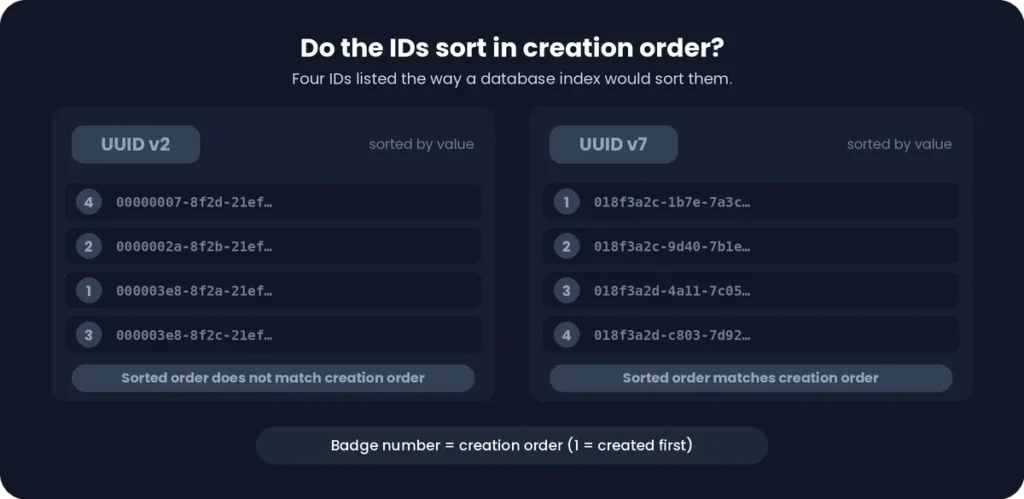
A UUID v2 starts with the local ID, not the time, so values do not sort by creation time. UUID v4 values are fully random, which can scatter inserts across a database index.
For new applications, UUID v7 is the better pick when you want sortable IDs. UUID v2 is best kept for legacy DCE use.
UUID v2 Compatibility With Programming Languages and Frameworks
Many developers land on this page after searching for generatedvalue generator uuid2 or uuid2 genericgenerator. The names look similar to UUID v2, but they are not the same thing.

In most programming environments, “uuid2” is a name a library gave to its own generation strategy. A DCE Security UUID is a specific UUID version with a local ID and a domain. Our generator creates the real DCE UUID version 2.
UUID v2 With Java GeneratedValue
In Java, @GeneratedValue is a standard JPA annotation. It tells the persistence provider to generate a value for an ID field automatically.
The annotation does not generate a DCE UUID v2. It only asks the provider to produce a value. What you get depends on the strategy and the provider you use.
For example, GenerationType.UUID asks the provider to generate a UUID. The JPA specification does not define which UUID version it must be, and Hibernate uses a random UUID (version 4) by default.
The standard java. util.UUID class works the same way. It can create random (v4) and name-based (v3) UUIDs, but it has no built-in method for DCE Security UUIDs.
If you need a true UUID v2 for a Java project, generate it with our tool and use it as a fixed value or test input.
Hibernate GenericGenerator and the uuid2 Strategy
Hibernate uses @GenericGenerator to select a custom ID strategy. One of these strategies was named uuid2:
java
@Id
@GeneratedValue(generator = "uuid2")
@GenericGenerator(name = "uuid2", strategy = "uuid2")
private UUID id;
The name “uuid2” here is a Hibernate label. It is not a DCE Security UUID version 2. The strategy created standard RFC 4122 UUIDs, and by default they were random version 4 values.
The label “uuid2” was meant to separate it from Hibernate’s older UUID strategy, which produced a non-standard 32-character string.
Newer Hibernate versions favor the @UuidGenerator annotation, and @GenericGenerator is deprecated. Check the documentation for your version.
In short, UUID v2 generator code and DCE UUID v2 are two different things. Do not expect the first to produce the second.
Can Existing UUID Libraries Generate DCE UUID v2?
Often, no. Library support for UUID versions differs a lot.
Most libraries cover versions 1, 3, 4, and 5, and many now add versions 6, 7, and 8. Version 2 is often left out for three reasons:
- It is a legacy version that is rarely used today.
- It needs extra inputs, such as a domain and a local ID.
- The standard UUID specification does not fully define its layout.
A generic UUID generator may therefore not support DCE Security UUIDs at all. It may also use the word “v2” or “uuid2” for something else.
Always verify the result. Check that the first digit of the third group is 2, and that the variant digit in the fourth group is 8, 9, a, or b. Then check that the local ID and domain sit in the right places. In a real UUID v2, the first group is the local ID, and the last two digits of the fourth group are the domain.
Our UUID v2 generator builds these fields correctly and shows them in the information panel, so you can check each one.
UUID v2 Use Cases and Limitations
UUID v2 is a niche, legacy UUID version. Its use cases are narrow, and its limitations are the reason most developers choose something else.
This section explains where a uuid2 value still makes sense and where another version is the better pick.
Legacy DCE Security and RPC Applications
DCE Security UUIDs were created for the Distributed Computing Environment, a framework for networked systems and remote procedure calls (RPC).
In those systems, a UUID could carry a user ID or group ID inside it. This let security services link an identifier to a person, a group, or an organization.
Today, UUID v2 matters mainly for compatibility. You may need it when you maintain a legacy DCE-based system, or when you must read or reproduce identifiers created by one.
Why UUID v2 Is Rarely Used Today?
Several limitations explain why UUID v2 has faded:
- Limited library support: many UUID libraries skip version 2 entirely.
- Legacy-specific design: it was built for DCE security, not for general applications.
- Extra complexity: you must supply a domain and a local ID, and the local ID is a number from your own system.
- Weaker uniqueness: the timestamp is reduced to about 7-minute steps, and the clock sequence has only 6 bits.
- Modern alternatives: UUID v4 and UUID v7 are simpler, more flexible, and widely supported.
A UUID v2 can also reveal a user or group ID and a node ID, which is a privacy concern in many projects.
When Should You Use UUID v2?
UUID v2 makes sense in a few specific cases:
- You need compatibility with an existing DCE Security implementation.
- A legacy application requires it.
- A system specifically expects a DCE UUID v2.
In these cases, our UUID v2 generator lets you set the domain, local ID, timestamp, node ID, and clock sequence to match what the system expects.
For everything else, choose a different version:
|
Need |
Better choice |
|
General-purpose unique IDs |
UUID v4 |
|
Sortable IDs for databases |
UUID v7 |
|
Privacy-friendly IDs with no embedded data |
UUID v4 |
In short, use UUID v2 when a legacy system demands it. Use UUID v4 or UUID v7 for new projects.